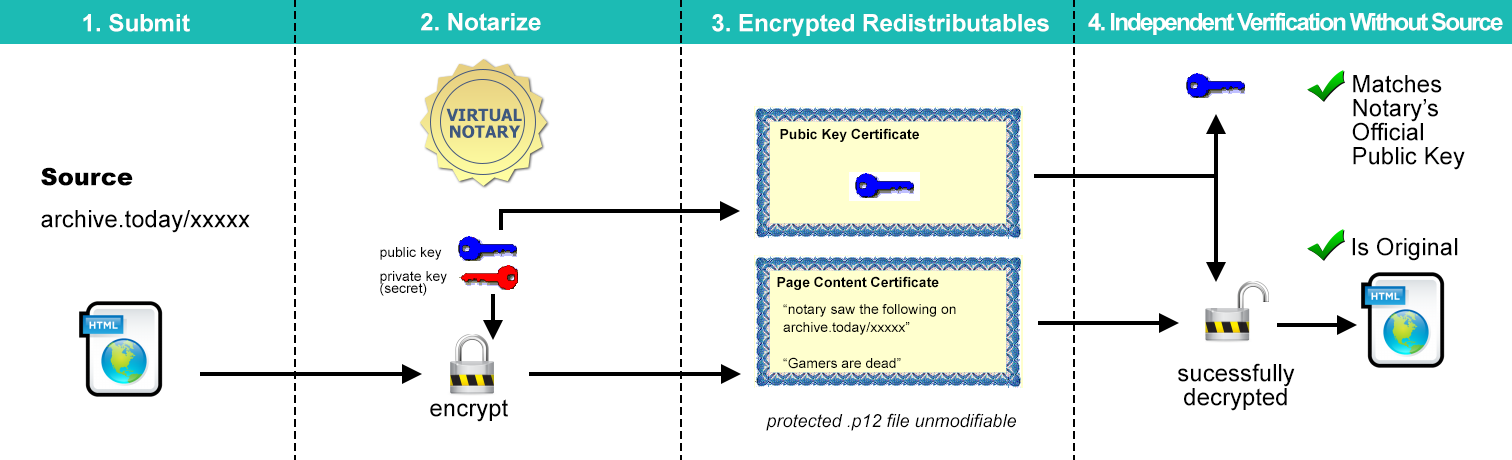
The list of archive links were collected and sent to Virtual Notary.org. Virtual Notary is an independent third party which downloads the webpages from the links by itself, obtains the content and signs it. Finally a certificate and a notary log are provided.
The signed certificate states in the following format:
Virtual-Notary.Org hereby notes that on
  Date: Friday January 23, 2015 02:59.23 EST (UTC-0500)
  the contents of the web page at the address
  URL: xxxxx
  had the following HTML content:
  [omitted]
Each certificate is protected by asymmetric encryption, meaning only the organization with the secret private key can produce/modify such certificate. Others are not able to modify it during redistribution or the certificate will be invalid. Check the Virtual-Notary.org FAQ page for details.
Verification Options
- Submit the certificate to Virtual-Notary.org to examine it.
-
Offline processing. Using tools such as OpenSSL.
If Virtual Notary goes offline one day, the certificates and its content can still be verified. Offline processing is also suitable for batch certificate examination.
Use the following OpenSSL command to extract a p12 file. The password is empty.
openssl pkcs12 -in cert.p12 -out cert.txt -password pass:
You will see 2 smaller certificates in the output. The first one certifies the content of the webpage. The second one is the public key certificate. Check the public key certificate against the official public key of Virtual Notary and see it if matches. If not, the certificate is not from Virtual Notary and may be tampered with.
Copy the first the certificate to a new text file. eg. content.txt Then use the following OpenSSL command to see the original text.
openssl x509 -in content.txt -text -noout
If you are on Windows, you can also dump the result to a file.
openssl x509 -in content.txt -text -noout>original.txt
Tips
- To verify all these certificates, you only need to submit one of them to the notary for examination. If it passes then the rest will pass too, given you have checked their public keys matching the official one (the one in the first certificate submitted).
- Redistribution is encouraged. Because at the end of the day valid certificates are original/untampered.
Known Issues
- Failed links in the list. They failed mostly likely due to Virtual Notary cannot take pages that are too big.
- At the time of writing, Virtual Notary is a little buggy when examine certificates online. If you see a unicode decoding error. That means the certificate is valid and you can find the decrypted content in the error report.
- This certification is not archive.today. It does not display the layout as you seen on the screen, but the html text of the page. If you have other copy of the same page you can use this to verify if your copy is original.
- Currently the only way to get the public key certificate is to extra it from a p12 certificate from the notary. Or extract from a p12 certificate that passes the notary's examination.